How to Opt Out of Lindung 24 Jam

The Lindung 24 Jam scheme allows eligible employees in Malaysia to choose whether they wish to participate in 24-hour protection under PERKESO (SOCSO). If you have decided not to participate in the scheme, you must submit your selection through the official PERKESO Benefits Application Portal.
Note: This guide is intended for employees who wish to select "Do Not Participate" (Opt Out) under the Lindung 24 Jam scheme.
Table of Contents
1.0: Portal Registration
Step 1.1
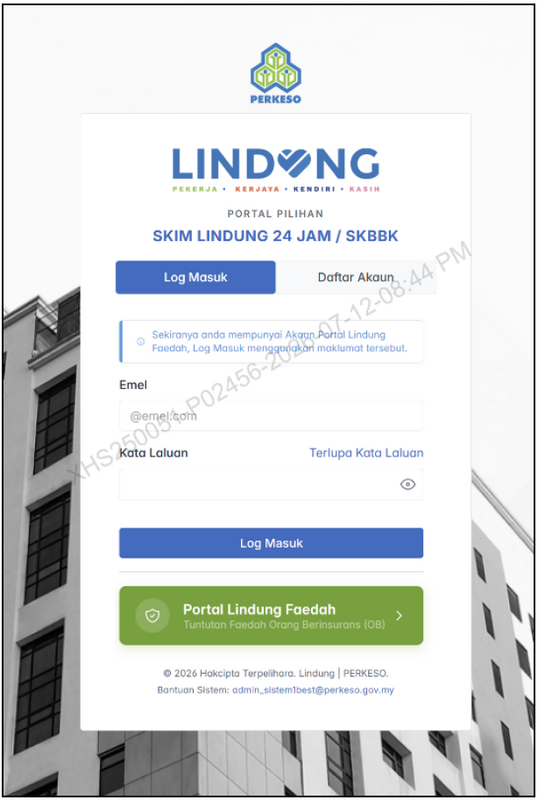
Please access the Benefits Application Portal via the following link: https://lindungfaedah.perkeso.gov.my/auth/
Click "Log In" if you already have an existing ID.
Step 1.2
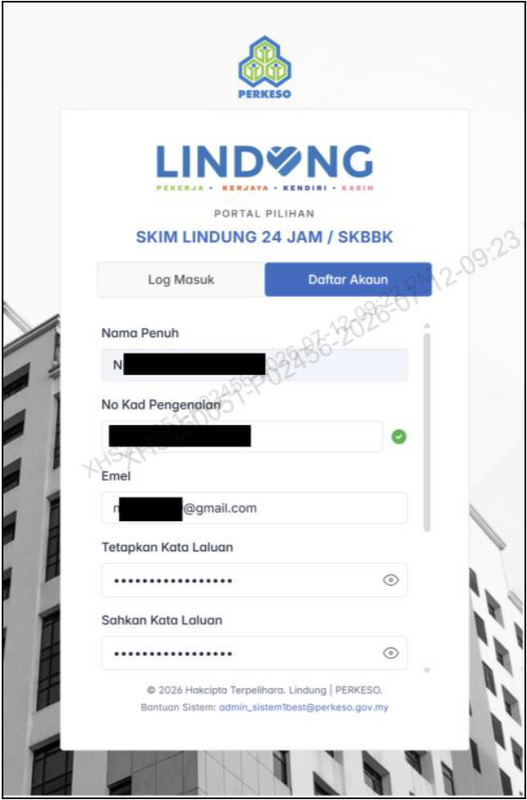
Click "Daftar Akaun" for New User Registration and complete the following information:
- Full Name (As stated on your National Identity Card / NRIC).
- Identity Card Number.
- Email Address.
- Set a Password (must contain at least 8 characters and 1 symbol e.g., @#$%^&*).
Tick (✓) to agree to the User Terms and Conditions, then click "Daftar Akaun" after completing all required fields.
Step 1.3
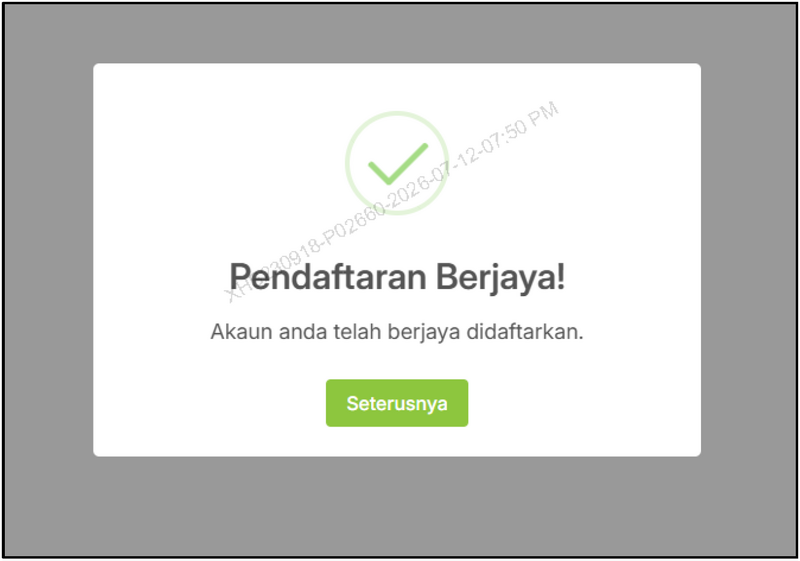
The system will display a successful registration confirmation message. Click the "Seterusnya" button to proceed.
Explore Jobs by Specialty
Select a category below to view active openings immediately:
2.0: Employee Protection Participation Selection
Step 2.1
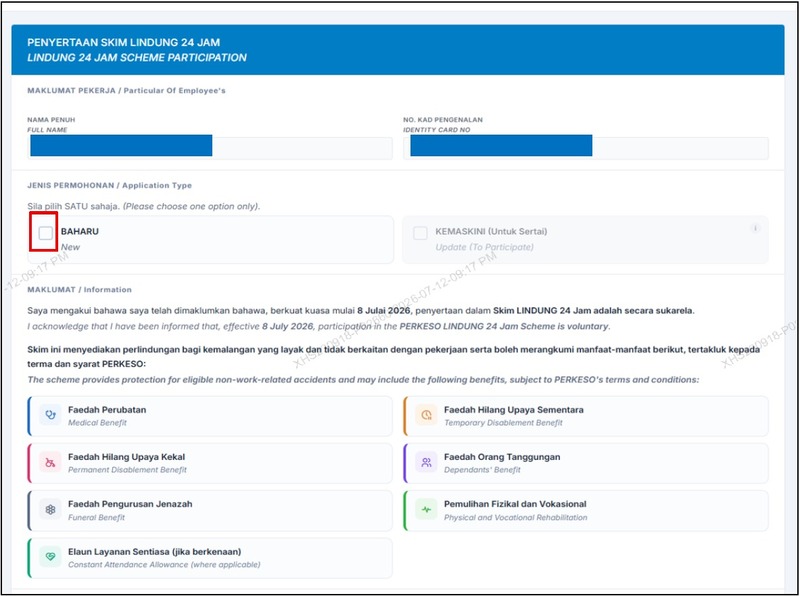
Click the "New" button under Application Type and read the information displayed on the screen carefully.
Step 2.2
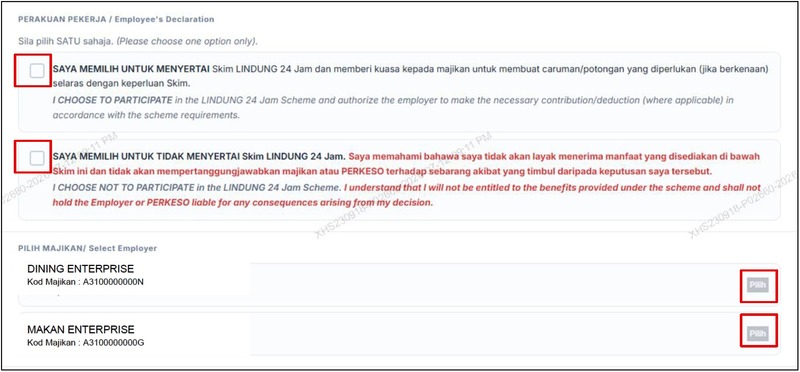
Under the Employee Declaration section:
- Tick (✓) your preferred Lindung 24 Jam Scheme participation option.
- Click the "Select" button for the active/latest contributing employer if you have multiple employers and choose to participate.
To Opt Out: Select the option labeled "Saya memilih untuk tidak menyertai Skim LINDUNG 24 Jam".
Step 2.3
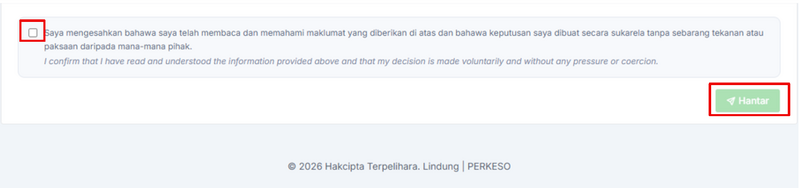
Tick (✓) the declaration confirmation checkbox and click the "Hantar" button.
Step 2.4(i) — Opt-Out Confirmation
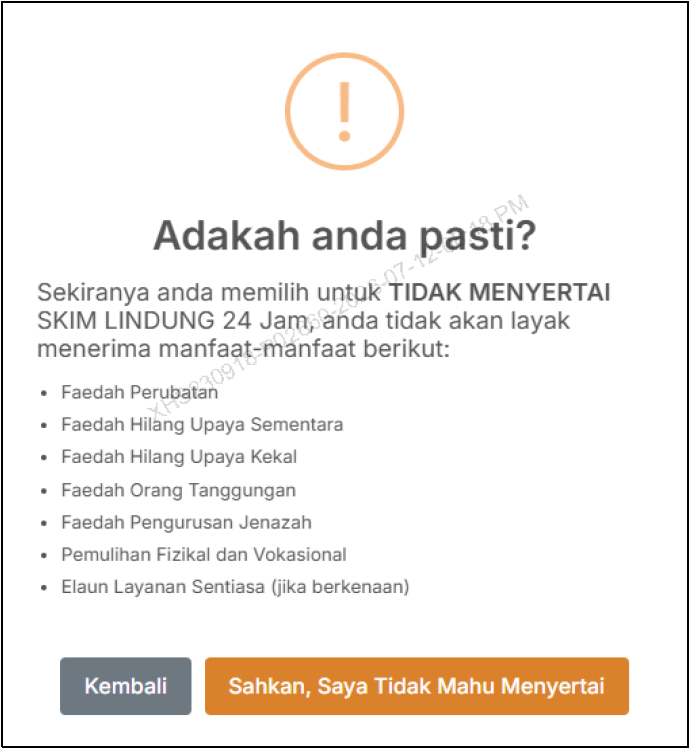
If your chosen option is NOT PARTICIPATING in the 24-Hour Protection, the screen will display a confirmation dialog:
- Click "Sahkan, saya tidak mahu menyertai" to finalize your opt-out choice.
- Click "Kembali" if you wish to change your scheme selection.
Step 2.4(ii) — Participation Confirmation (Alternative)
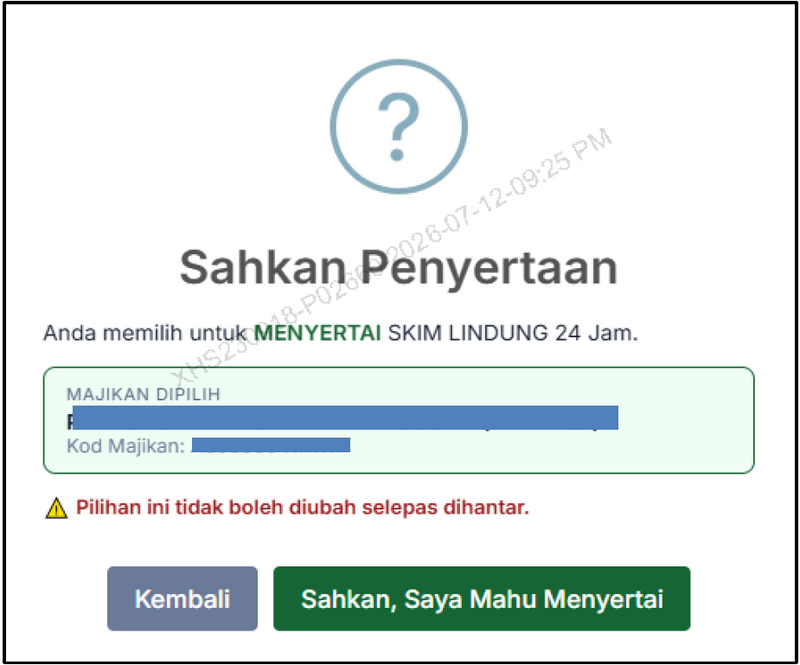
If your selected option is PARTICIPATING in the scheme:
- Click "Sahkan, saya mahu menyertai" to confirm participation.
- Click "Kembali" to return and change your decision.
Step 2.5
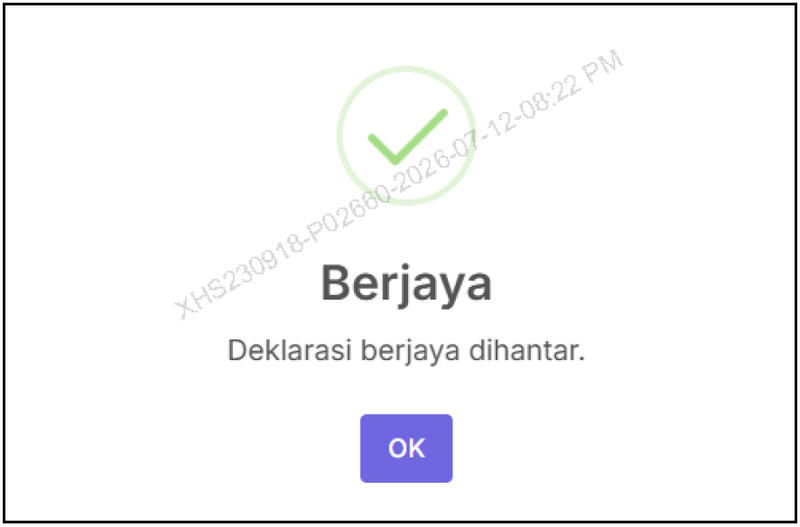
The screen will display a success confirmation message. Click "OK".
Step 2.6
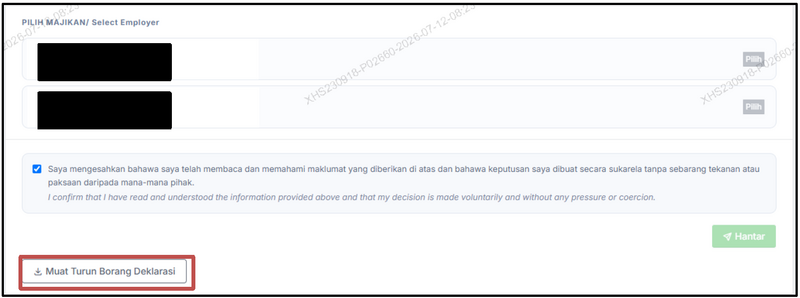
Click "Muat Turun Borang Deklarasi" to download your declaration form for your official records.
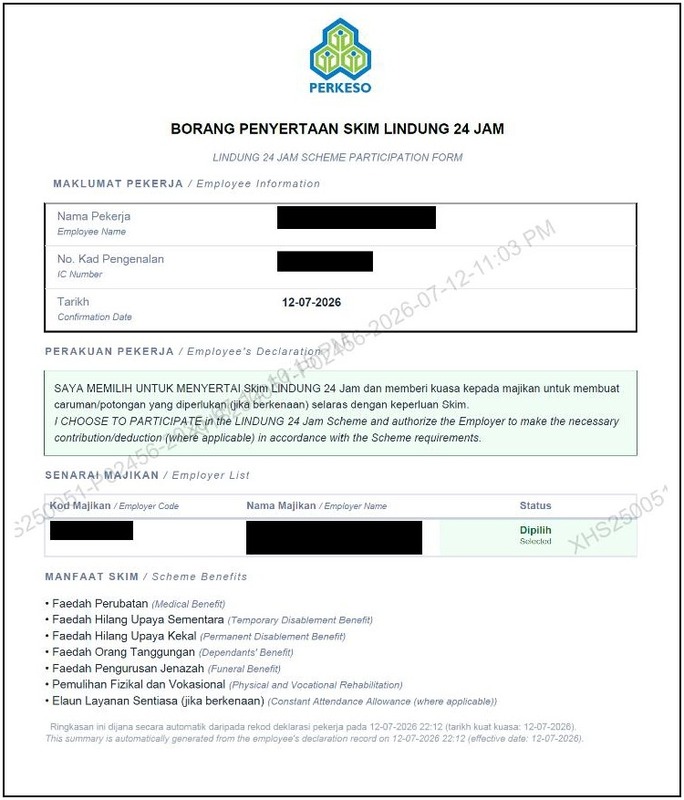
Sample Declaration Form — PARTICIPATING
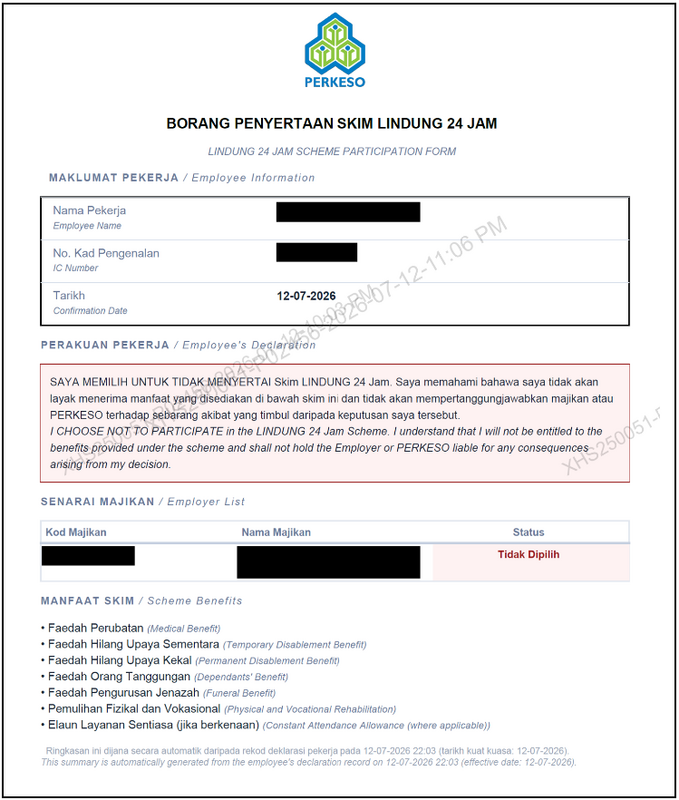
Sample Declaration Form — NOT PARTICIPATING (Opt Out)
Frequently Asked Questions (FAQ)
1. Can I opt out of Lindung 24 Jam?
Yes. Employees in Malaysia are given the option to choose whether they wish to participate in the Lindung 24 Jam scheme through the official PERKESO Benefits Application Portal.
2. Do I need to create an account first?
Yes. If you do not already have a portal account, you must register a new account on the PERKESO portal before submitting your selection.
3. Can I download proof of my selection?
Yes. After completing the submission, you can download the official Declaration Form (Borang Deklarasi) as your official proof of submission.
Conclusion
Opting out of the Lindung 24 Jam scheme is a straightforward online process completed through PERKESO's official Benefits Application Portal. Simply register or log in, select your preferred participation option, confirm your declaration, and save the generated declaration form for future reference.
Always ensure that you submit your selection through the official portal and maintain a digital or physical copy of your declaration form as proof.
Explore Jobs by Specialty
Select a category below to view active openings immediately:
Disclaimer:
The information provided in our blog articles is intended for general informational purposes only. It is not a substitute for professional advice and should not be relied upon as such.
While we strive to provide accurate and up-to-date information, the ever-evolving nature of certain topics may result in content becoming outdated or inaccurate over time. Therefore, we recommend consulting with qualified professionals or experts in the respective fields for specific advice or guidance. Any actions taken based on the information contained in our blog articles are solely at the reader's discretion and risk. We do not assume any responsibility or liability for any loss, damage, or adverse consequences incurred as a result of such actions.
We may occasionally provide links to external websites or resources for further information or reference. These links are provided for convenience and do not imply endorsement or responsibility for the content or accuracy of these external sources. Our blog articles may also include personal opinions, views, or interpretations of the authors, which do not necessarily reflect the views of our organisation as a whole. We encourage readers to verify the accuracy and relevance of information presented in our blog articles and to seek professional advice when needed. Your use of this website and its content constitutes acceptance of this disclaimer.
References
Related Post
 STR 2027 Malaysia: Latest Updates, Eligibility, Payment Dates & Assistance AmountsGeneral
Last Updated: 16 October 2026 Malaysia's Sumbangan Tunai Rahmah (STR) 2027 programme is now open for applications, offering eligible Malaysians...
 STR 2027 Application: How to Apply Online in MalaysiaGeneral
Updated: 16 October 2026 The Sumbangan Tunai Rahmah (STR) 2027 application is officially open, allowing eligible Malaysians to apply for government...
 Malaysia Budget 2027: Full Highlights and Key AnnouncementsGeneral
Malaysia Budget 2027 outlines the government’s priorities for economic growth, household financial support, public services and national...
 Malaysia Public Holiday Calendar 2027: Complete Federal and State Holiday GuideGeneral
Updated: 22 September 2026 The Malaysia 2027 public holiday calendar has been updated to reflect the official 2027 Federal and State Public...